Disclaimer
If you are the copyright holder of any content located on this website and do not
want it to remain accessible, we are ready to assist you and remove it as soon as possible.
Send an email providing the following information:
- Documentary evidence of your rights to the copyrighted material: a scanned document with a seal or other
information that allows you to clearly identify yourself as the copyright holder of this
material/product.
- Link to the location of the material on our website and an accompanying comment indicating the official
source or other information about the location of the original content.
For clarity, we do not directly host any file on our server; contents are
sourced from third-party services.
Money For Nothing
No guarantees here... I have also just started but here I am giving a shot with the referrals.
An easy, low-effort setup that runs directly in your browser.
1.) Please register an account for each website using my referral link/code:
-
Sign up on 3DOS
-
Sign up on Grass
-
Sign up on Teneo
- DAWN needs you to register an account first to apply my referral code:
Sign up on
DAWN
- Leave all of these opened in your browser for later use.
2.) Open your Chrome browser or any Chromium engine browser.
3.) 3DOS Extension Setup:
-
Install 3DOS Network Extension
- After installing the extension.
- Click on the highlighted "here" button beside the "Get Api key" text.
- Log in to your account.
- Look for the provided api key on the top right of the dashboard page.
- Copy and paste it into the extension then hit apply.
4.) Grass Extension Setup:
-
Install Grass Lite Node Extension
- After installing the extension, log in to your account.
- Click on Connect Grass
5.) Teneo Extension Setup:
-
Install Teneo Community Node Extension
- After installing the extension, log in to your account.
- Click on Connect Node
6.) DAWN Extension Setup:
-
Install DAWN Validator Chrome Extension
- After installing the extension, log in to your account.
- Go to the extension's drop-down menu and click on Referrals.
- Enter my Referral code: H0Z096KV
7.) Reminder:
- Leave your PC turned on 24/7 and auto run your browser on startup.
- Log in to their website every day to claim bonuses!
- You're all set! DM me if you're having trouble setting it up.
Frequently Asked Questions
-
What is the password to this compressed file?
▼
koaigaming
-
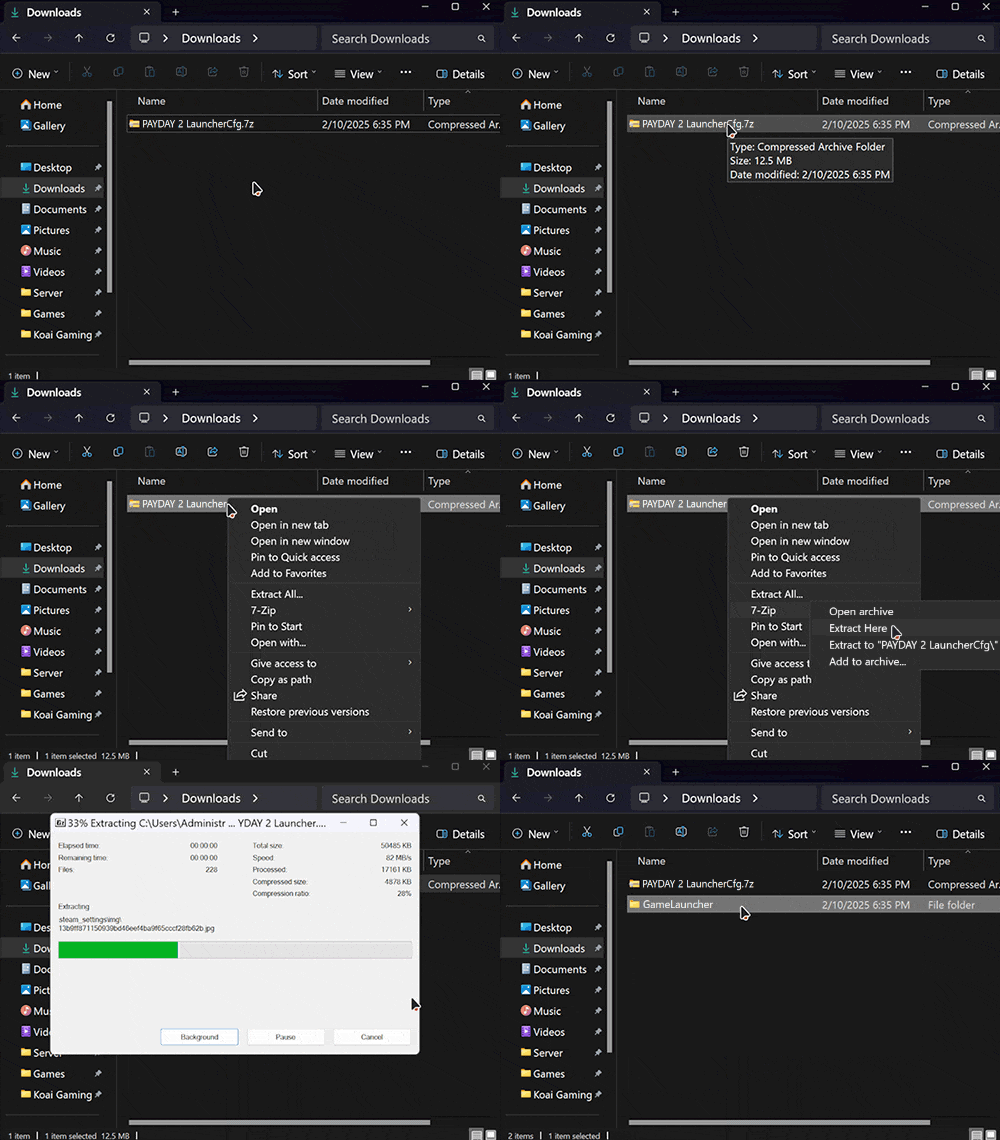
How to extract the .7z file I just downloaded?
▼
Download and install 7-Zip.
-
I've downloaded and extracted the game files, now what?
▼
Download and extract Launcher and LauncherCfg files into the game's root folder.

-
I followed all instructions but my game still won't launch?
▼
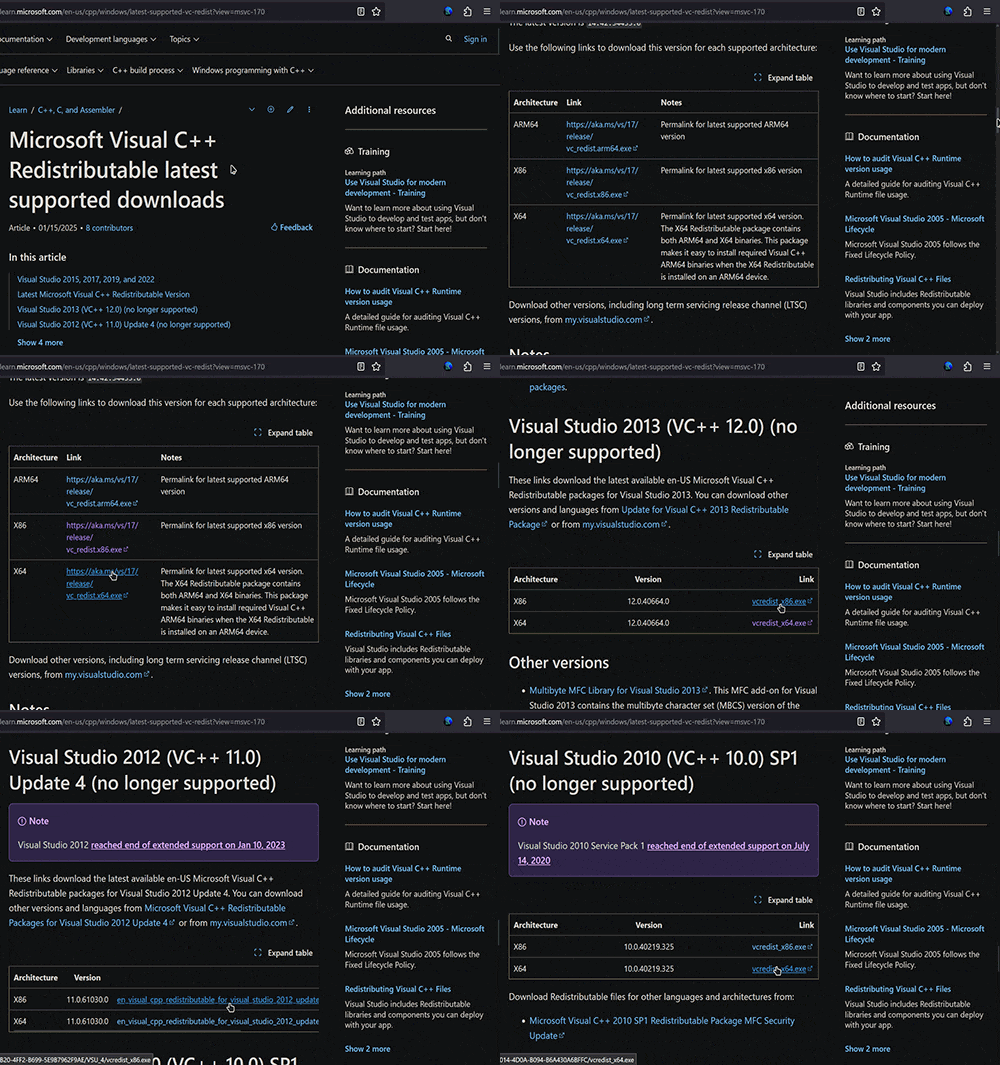
Remember to always install every redistributable.
Microsoft Visual C++ Redistributable
.NET 6.0 Desktop Runtime
.NET 8.0 Desktop Runtime
-
How to play online using the SteamLoader?
▼
Install Radmin VPN
then create your own network or join us!
Network name: Koai Gaming Network
Password: koaigaming

-
How to play online using Steam?
▼
Search for the game on Online-Fix, log in to download the fix then extract it into
your game files.
-
How to invite a friend to my game?
▼
Press Shift + Tab to open the in-game overlay. (Don't forget to change your name inside the overlay
settings.)
-
Build/version is outdated, can we have an update?
▼
Hit me up on the Discord channel. I will update it as soon as possible!
-
The game files no longer exist, can you please reupload?
▼
Yes, just send me an email or contact me through the Discord channel.
-
Why do I have slow download speeds?
▼
Please use Free Download Manager!
-
Do I need the 64-bit Launcher files if the game runs on 32-bit?
▼
If the game runs on 32-bit. You can delete the SteamLoader_x64.exe and GameOverlayRenderer64.dll,
vice versa.
-
Why can't I find or connect to my friend's game?
▼
Radmin VPN and the game should not be blocked by your firewall or antivirus. If the issue persists,
find help on Discord.
-
My controller is not working, how to fix it?
▼
Use DS4Windows and follow the instructions to get it working!
-
Why is the SteamLoader flagged as virus?
▼
Files were tested on my own PC prior to compression and upload but due to its
nature of modification, antivirus softwares may flag them but I assure you these detections are
false positives.